
Rony Harness
Rony Harness is a terminal-first workspace for turning an LLM into a useful software agent. It can connect to hosted providers such as Claude and GPT, or to local runtimes such as Ollama and llama.cpp, then give the selected model real tools for reading, editing, searching, and running work inside a project.
The important part is the loop around the model: Rony shows what it is doing, asks before consequential actions, records the files it touched, and keeps the conversation available as a resumable session.
Read the public source repository ↗
Demo
The product is a terminal UI rather than a hosted web demo, so these captures show the workflow that matters: choose a model, frame the task, review the agent’s intent, approve tools, and inspect the resulting file without leaving the same interface.
01 — Select models and scripts
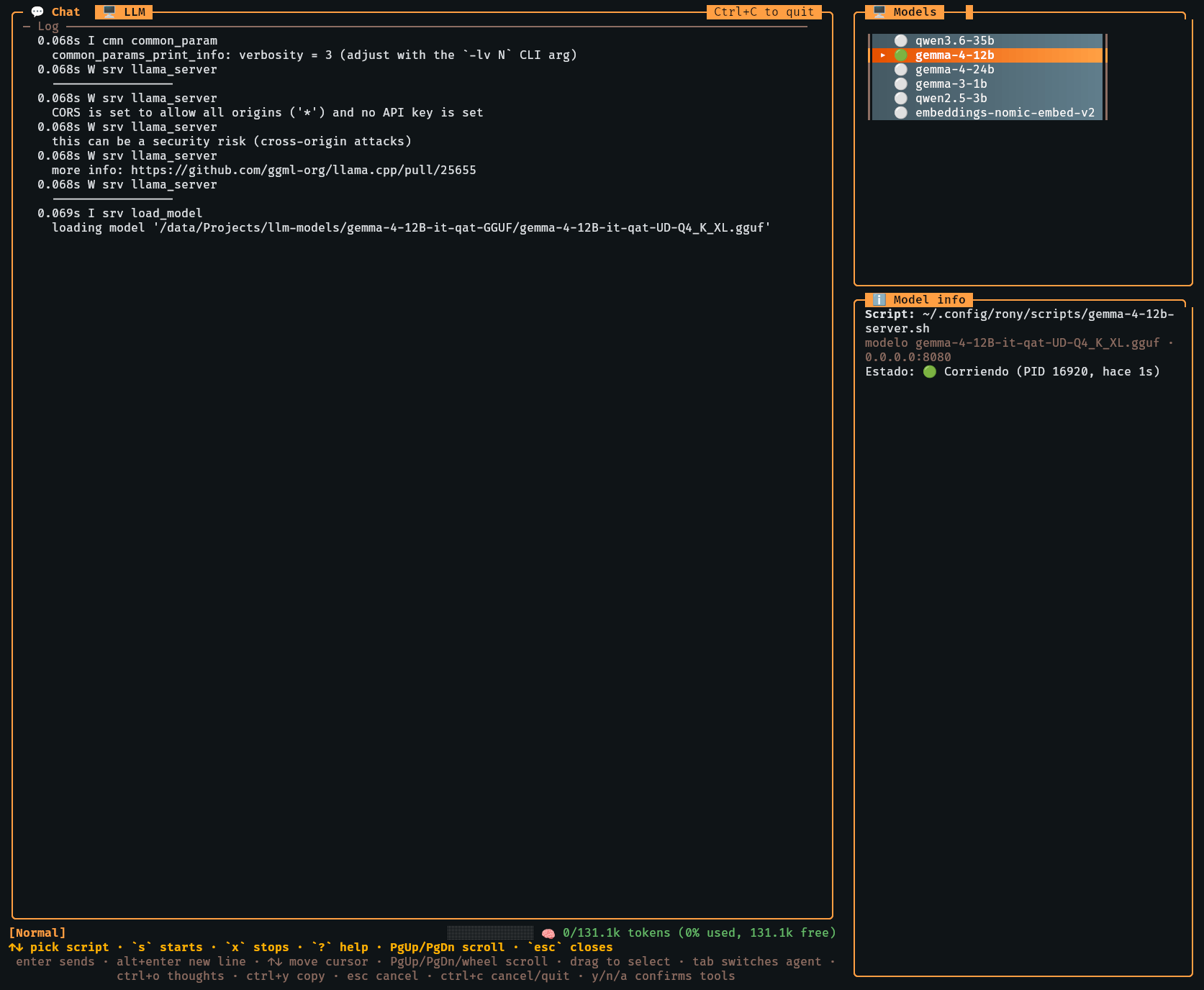
The /llm panel can expose several configured scripts and model profiles in
one place. Local models can be started and monitored from the sidebar while a
different provider remains available for the conversation. The model info
panel makes the selected script, model path, endpoint, and running status
visible before work begins.
02 — Keep commands close to the conversation
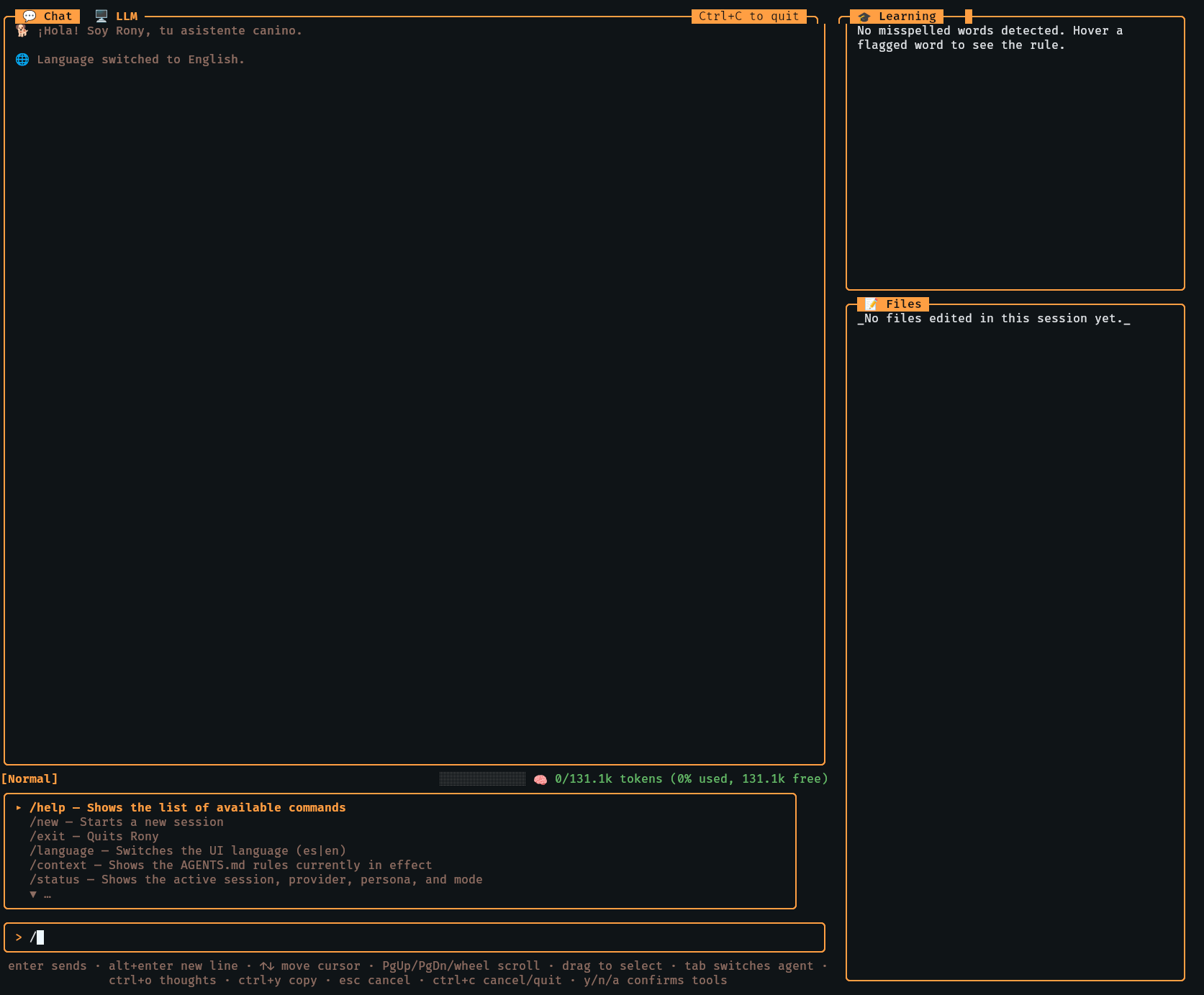
Slash commands open focused panels for context, status, tools, shortcuts, files, sessions, models, and the local LLM server. The learning sidebar also keeps spellcheck and translation feedback nearby, so utility actions do not need to compete with the main chat transcript.
03 — Show the reasoning and ask for permission
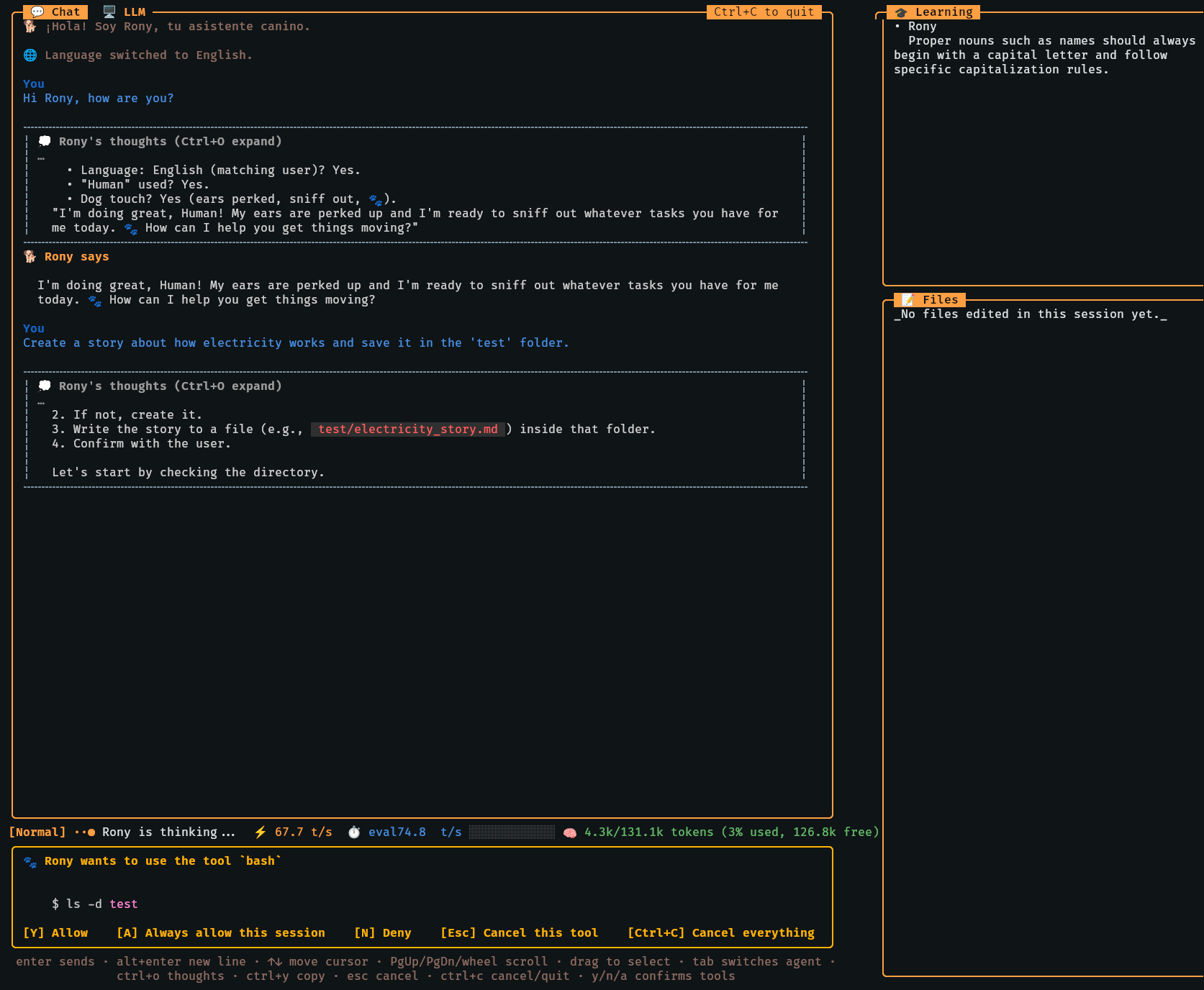
Rony’s thoughts can be expanded when a task needs more context, while the
approval card makes a tool call explicit. In the example, the proposed bash
command is shown before execution with clear Allow, Always allow,
Deny, and Cancel choices. This keeps human intent in the loop for
writes, edits, shell commands, and network access.
04 — Make tools and edited files visible
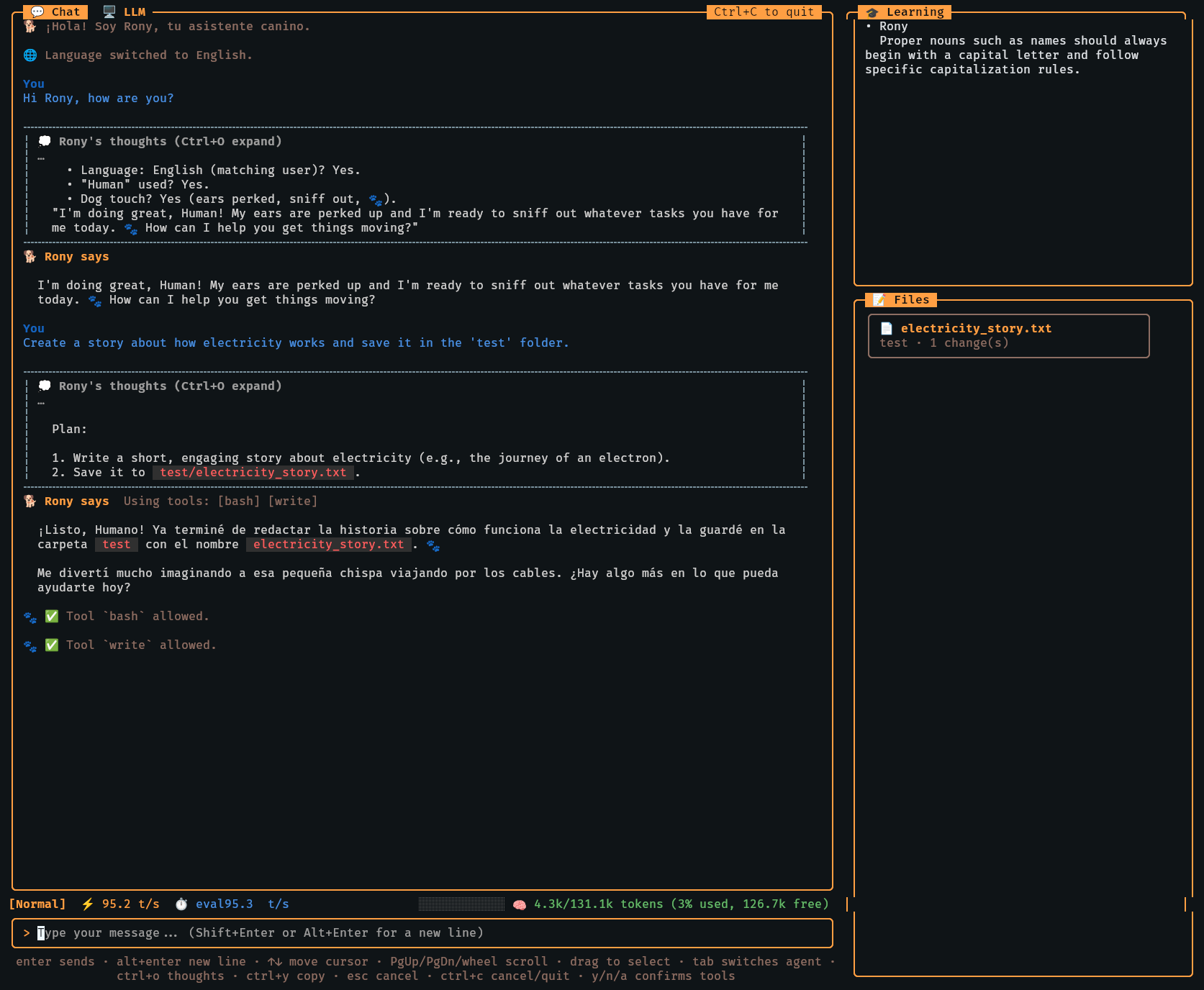
The final answer records which tools were used, and the Files sidebar lists the path and change count for files created or edited during the session. The result is easier to audit than a single opaque answer: the conversation shows the work, while the sidebar shows its concrete footprint.
05 — Read the created document in place
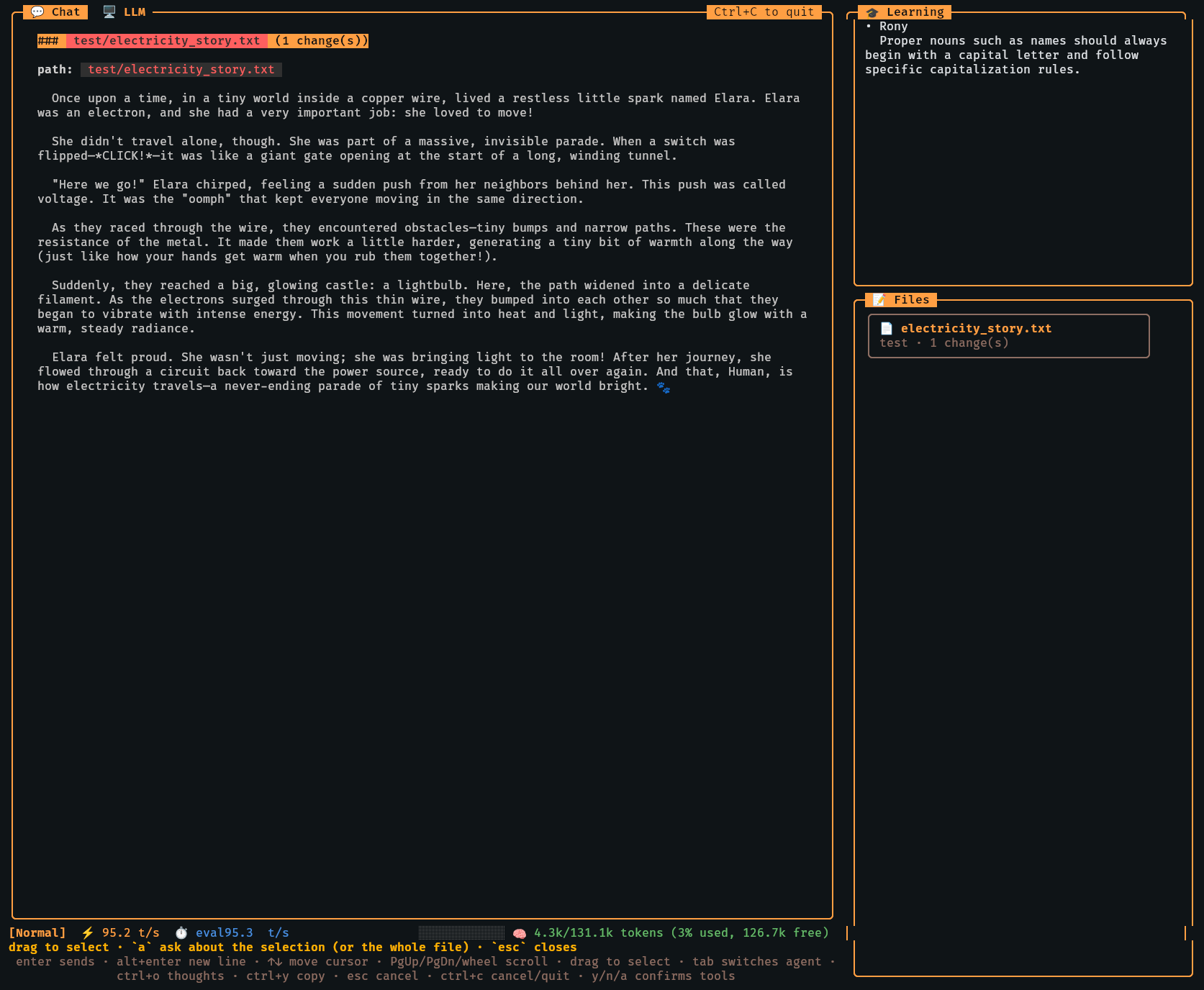
Selecting a file opens its content directly in the harness. That small detail closes the loop between an agent’s write action and the human review: you can inspect the generated document, compare it with the request, and continue the conversation without switching applications.
What’s inside
One interface for local and cloud models
Provider and model selection can come from CLI flags, environment variables, project configuration, user configuration, or the shared provider catalog. The supported client layer covers OpenAI-compatible endpoints, Anthropic, Ollama, and llama.cpp, so the same workflow can move between private local inference and hosted models.
A real software-tool registry
The harness registers file, shell, web, workflow, and memory capabilities:
read,write,edit,glob, andgrepfor project files.bashandwebfetchfor execution and external context.delegatefor builder and planner sub-agents.save_planandupdate_planfor durable work plans.- Memory and dictionary tools for reusable processes, facts, and language learning.
Modes that change the level of autonomy
Normal mode asks before tool calls, Build mode can auto-approve its configured
workflow, Plan mode stays read-only, and Chat mode is a lightweight read-only
assistant. They are modes for the same Rony persona, not separate characters,
and Tab cycles between them inside the TUI.
Sessions that survive the terminal
Conversations are stored in project-local SQLite databases. The CLI and the
/sessions panel support listing, searching, resuming, inspecting, exporting,
and deleting sessions, which makes a long software task a recoverable workflow
instead of a one-shot prompt.
Architecture
Rony Harness is the CLI/TUI layer around the sibling rony-llm-agent library.
The library owns the reusable agent loop, LLM client interfaces, persona,
memory primitives, and base sandbox components. This repository adds the
software-development surface:
- A single
ronybinary with Cobra commands for chat, sessions, configuration, diagnostics, and version information. - A Bubble Tea interface with a chat transcript, model and LLM panels, a learning sidebar, an edited-files sidebar, and interactive approval cards.
- A tool registry assembled from the harness’s file, shell, delegation, plan, memory, and dictionary tools.
- Agent-mode configuration,
AGENTS.mddiscovery, file attachments, and project-local session storage.
The result is a deliberate boundary: the library makes agent behavior reusable, while the harness makes that behavior comfortable and inspectable for day-to-day software work.
Design decisions
Approval is part of the product surface
Tool calls are rendered as visible events instead of being hidden behind the final response. Destructive operations default to an approval gate, and the bash sandbox applies allow and deny patterns before execution. The project documentation is explicit that filesystem confinement is still a follow-up; the current safety model is built around permissions, command filtering, and credential redaction.
Local-first without locking out hosted providers
Local llama.cpp servers can be started, stopped, monitored, and switched from
the /llm panel, while cloud providers remain available through the same
provider abstraction. This makes privacy, cost, latency, and capability a
runtime choice rather than a rewrite of the agent workflow.
A visible trail beats a magical answer
Thoughts, tool calls, approvals, tool results, and edited files all stay near the conversation. The interface is designed for a human who wants to know what happened and why, not only whether the model produced a plausible final paragraph.
Try the project
Rony Harness is a terminal application, so there is no browser demo to embed here. Explore the implementation, configuration reference, and as-built architecture in the public source repository ↗.
Files of note
cmd/rony— the executable entry point and CLI command wiring.internal/cli— the Bubble Tea chat, slash commands, panels, approvals, agent modes, sessions, and tool registry assembly.internal/tools— file, shell, and web handlers used by the harness.internal/storage— SQLite session persistence and export support.internal/sandbox— bash allow/deny patterns and execution limits.configs/ai_providers.yamlandconfigs/agents.yaml— provider and mode defaults that can be extended without changing the workflow code.docs/architecture.md— the repository’s detailed as-built technical reference.